

How AI Is Transforming Android App Development in 2026
Android remains the dominant mobile operating system globally. According to StatCounter, Android represented about 68% of worldwide mobile OS usage in August 2026. Its scale, combined with differences in devices, screen sizes and hardware configurations, makes compatibility, testing and performance important considerations for Android development.
Developers must manage complex integrations, device compatibility, security requirements, application data and rising expectations for personalized experiences, while businesses continue to push for faster releases.
AI in Android app development is changing how teams manage that workload. AI-assisted tools can generate code, troubleshoot build errors, support testing and analyse application performance. Machine learning is also powering predictive search, recommendations, conversational interfaces and personalized experiences within Android apps. With Gemini integrated into Android Studio, AI assistance is moving directly into everyday development workflows.
Android apps are increasingly incorporating AI-powered search, recommendations, assistants and automated workflows. These features introduce new development considerations around data access, model outputs, privacy and security.
The challenge for Android teams is deciding where AI improves development and where its risks around accuracy, security, privacy and data quality require greater control.
1. How AI Is Helping Teams Manage Android Complexity
Android development has become more demanding as applications expand across devices, screen sizes, hardware configurations and Android versions. Developers also must account for network variability, accessibility, security, battery consumption and performance while supporting features such as real-time updates, personalization and third-party integrations. These requirements increase the amount of development, testing and monitoring needed throughout the application lifecycle.
AI is reducing manual effort across several of these tasks. Coding assistants can generate boilerplate code, explain unfamiliar codebases, suggest fixes and help developers troubleshoot errors. In Android Studio, Gemini supports activities such as code generation, Jetpack Compose development, Gradle error resolution and crash analysis. Generative AI can also accelerate prototyping by creating initial code structures and UI components that developers can review and refine before production.
Testing presents another challenge because an application can behave differently across devices, operating system versions and usage conditions. AI-assisted testing can support test-case generation, failure analysis and identification of recurring issues, helping QA teams focus on higher-risk areas. AI can also analyse crash reports, logs and application behaviour to help developers investigate performance problems after release.
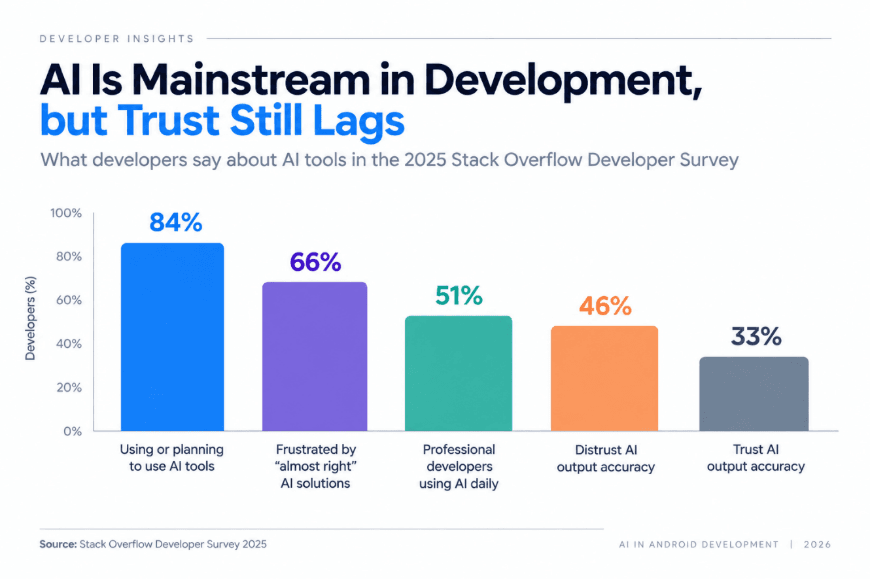
The 2025 Stack Overflow Developer Survey found that 84% of respondents were using or planning to use AI tools in their development process, up from 76% the previous year, while 51% of professional developers reported using AI tools daily. As AI becomes more involved in development and application functionality, teams also need to determine what information AI tools can access and how generated output is validated. Teams need clear rules for data access, privacy and reviewing AI-generated output before it is used in an application.
2. Where AI Creates Value Across Android App Development
AI is improving coding, testing, performance monitoring and user experience across Android development. Coding assistants can generate standard components, suggest implementations, explain unfamiliar code and support documentation, reducing repetitive work and allowing developers to focus on application architecture and business logic.
AI-assisted testing can help generate test cases, analyse failure patterns and identify areas that require additional testing across different devices and Android versions. It can also examine crash reports, application logs and performance data to help developers trace recurring issues and diagnose failures more efficiently.
Inside the application, AI supports personalization through recommendations, predictive search and content discovery. Learning apps can suggest content based on engagement patterns, while travel and retail apps can use relevant behavioural or contextual information to improve recommendations. Conversational AI also enables natural-language search, chat interfaces and voice interactions.
These features depend on data quality and data accuracy. Applications combining user activity, APIs and business systems require reliable data validation and data integration because incomplete or outdated information can affect recommendations, predictions and generated responses.
On-device AI can process certain tasks locally, reducing dependence on network connectivity and limiting the information sent to external systems. This can improve responsiveness and support data privacy. On-device AI can process certain tasks locally, reducing dependence on network connectivity and limiting the information sent to external systems. This can improve responsiveness and support data privacy.
3. The Risks Android Teams Need to Manage.
AI-assisted development introduces risks around code accuracy, security and governance. Generated code can use unsuitable APIs, miss edge cases or introduce logic errors, making developer review essential before production. This concern is reflected in the 2025 Stack Overflow Developer Survey, where 46% of developers distrusted the accuracy of AI tools compared with 33% who trusted them. The survey also found that 66% experienced frustration with AI-generated solutions that were almost correct, while 45% said debugging AI-generated code was more time-consuming.
Data security becomes particularly important when developers use external AI tools. Sharing proprietary code, API credentials, customer information or internal architecture can create exposure risks. Clear information security, data protection and data privacy policies should define what information can be shared and which AI tools are approved.
AI-powered application features create additional data risks. Recommendations, predictions and generative AI outputs depend on reliable information. Poor data quality can reduce output accuracy, while weak data governance can make data ownership, access and usage difficult to control.
Strong AI governance can establish requirements for model access, data usage, testing, human oversight and accountability. AI risk management should also address inaccurate outputs, security vulnerabilities, privacy risks and model failures. Applications operating in regulated environments may require additional AI compliance and regulatory compliance controls around personal data and automated decisions.
Cost and performance also affect AI implementation. Cloud models introduce recurring inference costs, while on-device models can increase storage, memory and battery requirements. Architecture decisions therefore need to balance scalability, performance, security and operating cost.
4. How to Introduce AI Into Android Development Responsibly
A practical AI strategy starts by identifying where AI can improve development without introducing unnecessary risk. Teams can begin with controlled uses such as documentation, code explanation, test generation and prototyping. AI-generated code should follow the same review, testing and cybersecurity requirements as manually written code before reaching production.
AI-powered applications also need a clear data architecture. Teams should know what data each feature uses, where it originates, how it is processed and where it is stored. Strong data management and data governance practices establish ownership, access controls and accountability. For larger data environments, data catalogs, metadata management and data lineage can provide greater visibility into available data and how it moves between systems.
Teams should define which AI models and tools are approved, what data they can access and when human review is required. AI-powered features should also be tested for inaccurate or unsafe outputs before release. Applications handling sensitive or regulated data may need additional privacy, security and compliance checks.
Technical expertise remains essential to effective AI implementation. Developers need knowledge of Kotlin, Android architecture, APIs, testing, data security and application performance to evaluate AI-generated output and make sound engineering decisions. For organizations pursuing AI transformation, combining these capabilities with clear governance provides a more structured path to long-term AI adoption.
Conclusion
AI is becoming a practical part of Android development, from coding and testing to search, personalization and in-app assistance. Its value depends on where it is applied and how carefully the resulting code and features are tested.
For development teams, that means using AI where it can reduce repetitive work or improve the application experience, while keeping human review, security and performance checks in the development process. As AI capabilities continue to evolve, these engineering fundamentals will remain important for building reliable Android applications.
12th Wonder helps businesses design and develop Android applications that integrate AI where it adds practical value. Talk to our team about building an AI-enabled Android application for your business.
FAQ
Build AI-Powered Android Apps for What’s Next
Bring AI into your Android applications with scalable development, secure integrations and intelligent experiences built around your business needs.