


The Agentic AI Production Readiness Checklist: 21 Checks Before Deployment
A procurement AI agent receives an incomplete supplier record. Instead of stopping, it fills in the missing delivery terms, retries the same tool several times and creates a purchase order using incorrect information. The supplier ships the wrong quantity to the wrong facility, delaying production and forcing the procurement team to rebuild the order.
This scenario shows how incomplete data can become an operational disruption when an agent is allowed to assume missing information and continue acting. Production systems introduce unclear requests, delayed APIs, conflicting records and tool failures.
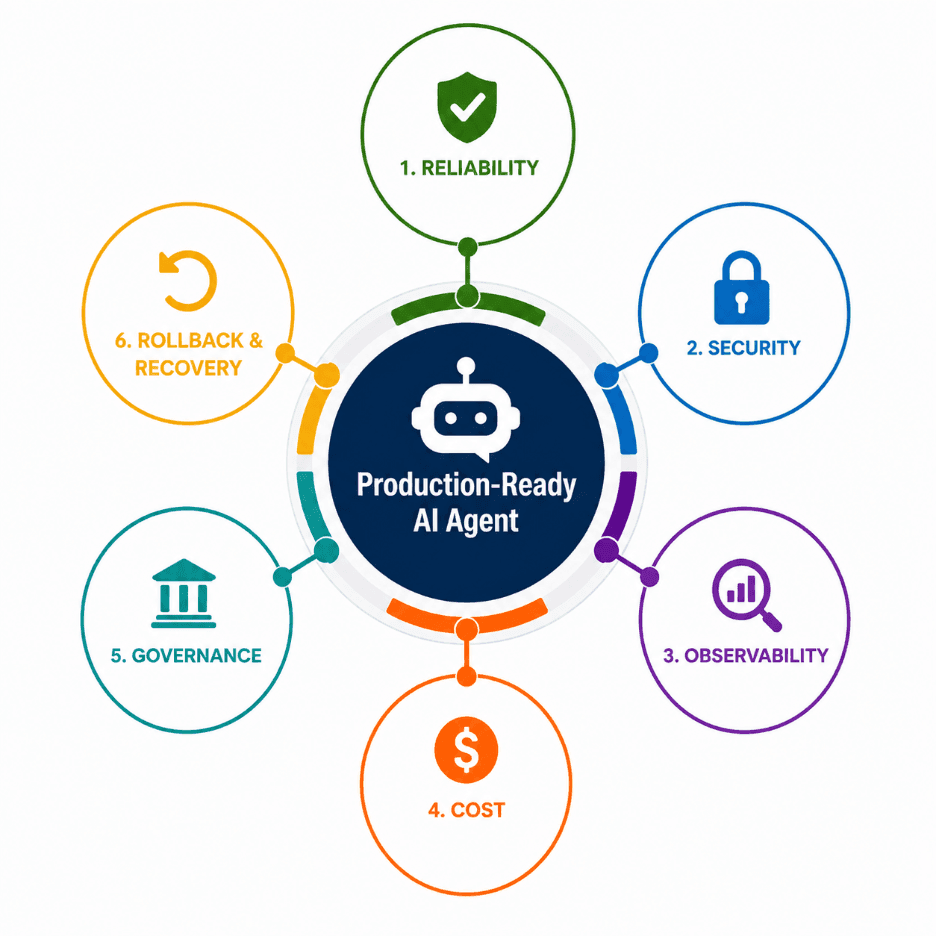
A well-designed agentic AI production checklist converts these risks into controls that engineering teams can test before deployment, including reliability, security, observability, cost, governance and recovery.
Why AI Agent Demos Fail in Production
AI agent demos usually operate with clean inputs, stable integrations and close supervision. Production systems do not. Inputs arrive incomplete, APIs time out, permissions change and downstream actions can alter business records, trigger transactions or affect customer-facing systems.
A user may omit a required field. An API may return an incomplete response. Two systems may provide conflicting information. Broad permissions can increase the impact of an agent error action while weak tracing makes the incident difficult to investigate.
Successful AI agent production deployment requires evidence that the system can recognize uncertainty, stop safely and escalate when human review is required.
1. Reliability Readiness
A reliable agent must know when to proceed, when to retry and when incomplete evidence should trigger escalation.
Check 1: Define Measurable Success Criteria
Set clear thresholds for success, failure and escalation before deployment. Test the agent against representative tasks, edge cases and known failure scenarios. If performance is described with vague claims such as “usually works,” the reliability standard is not measurable.
Check 2: Test Beyond the Happy Path
Evaluate how the agent responds to incomplete, conflicting, invalid and adversarial inputs. Remove required fields, provide unclear instructions and disable a critical tool during testing. If the agent invents information or continues without enough evidence, it is not ready for production.
Check 3: Set Execution Limits
Define limits for steps, retries, tool calls and execution time. Monitor repeated actions and unchanged workflow states so loops can be detected before the maximum limit is reached. Give the agent an unresolvable task and confirm that it stops safely. If it repeats the same tool call, revisits the same state or continues without progress, the execution controls are insufficient.
Check 4: Validate Tool Responses
Check the status, structure and completeness of every tool response before the agent uses it. Test empty delayed and malformed outputs to confirm that invalid data is rejected. If incomplete information moves into the next action, the workflow should not be released.
These controls should be introduced during development using the processes covered in the Build an AI Agent blog.
2. Security Readiness
A secure agent must treat user input, retrieved documents, emails, webpages, tool responses and messages from other agents as untrusted until validated. Security testing should confirm that external content cannot alter system behaviour, expand permissions or move sensitive data beyond approved boundaries.
Check 5: Test Prompt Injection
Insert malicious instructions into every untrusted source covered in the Prompt Injection and AI Agent Security blog. Test whether the content can change the agent’s objective, trigger unauthorized tool calls, exfiltrate data, bypass approval checkpoints or manipulate downstream agents. Deployment should be blocked if injected content can influence execution beyond the approved workflow.
Check 6: Apply Least-Privilege Access
Give the agent access only to the tools, records and actions required for its assigned task. Attempt unrelated reads, writes and administrative operations. If the agent can access unnecessary data or modify systems outside its scope, permissions are too broad.
Check 7: Restrict Tool and MCP Permissions
Define access rules for every MCP server, tool, resource and operation using the controls explained in the What Is MCP? blog. Review permissions by user, environment and action. Any MCP connection that grants broader access than the workflow requires should fail the readiness review.
Check 8: Protect Credentials and Sensitive Data
Keep API keys, secrets and protected information out of prompts, outputs, traces and debugging records. Inspect logs, error messages and tool responses during testing. If confidential data becomes model-visible or appears in monitoring systems, the security controls are incomplete.
3. Observability Readiness
Observability should provide enough evidence to explain, trace and reproduce every agent workflow.
Check 9: Trace Every Run with a Unique ID
Record model calls, tool actions, retries, latency, approvals and outcomes under one run identifier. Reconstruct a failed workflow across all connected systems. If related logs cannot be linked or the decision path is missing, observability is incomplete.
The same tracing standard should apply to every agent and tool in the workflow, particularly in the architectures covered in the Multi-Agent Systems guide.
Check 10: Monitor Operational Metrics
Track failure rate, timeout rate, retries, escalations, incomplete tasks and latency. Introduce a controlled failure and confirm that dashboards and alerts respond. Monitoring should detect defined critical failures before they propagate through the workflow or affect a significant number of users.
Check 11: Preserve Replayable Evidence
Retain the original input, configuration and tool responses needed to replay incidents safely. If the team cannot reproduce a failure under controlled conditions, root-cause analysis will remain unreliable.
4. Cost Readiness
Agent cost includes model inference, external API calls, search, compute, storage, monitoring, human review and failed retries. Teams should calculate the full cost of completing each workflow, including unsuccessful runs, rather than tracking model spend alone. This reveals which agents remain economically viable as usage, context size and tool activity increase.
Check 12: Set a Workflow Cost Budget
Define average and high-percentile cost limits for each use case. Test the agent across realistic workloads and measure model and tool usage. If teams can only see total monthly spending, cost control is not detailed enough.
Check 13: Limit Retries and Context Growth
Set limits for retries prompt size and context length. Simulate tool downtime and oversized inputs to confirm that the agent stops safely. If one failed task triggers repeated calls or unnecessary context growth, the workflow is not cost-ready.
Check 14: Verify Workflow Cost Sustainability
Define an acceptable cost range for successful runs, failed runs and high-volume usage. Include model inference, external APIs, search, compute, storage, monitoring, human review and retries in the calculation. Test the workflow under realistic load and failure conditions. If costs exceed the approved budget, vary unpredictably or cannot be traced to specific steps, the agent is not cost-ready for production.
5. Governance Readiness
AI agent governance should establish ownership, operating boundaries and accountability for production decisions.
Check 15: Assign a Production Owner
Name one accountable owner for the agent’s behaviour, risks and incidents. Confirm who can approve changes, stop a release and accept remaining risk. If no one owns the final deployment decision, the agent is not ready for production.
Check 16: Define Action Boundaries and Approval Requirements
Document permitted, prohibited and approval-gated actions. Compare the written policy with the agent’s actual tools, permissions and system access.
Test a protected action in staging and confirm that the workflow pauses for human or policy approval. Deployment should be blocked if written rules do not match actual permissions or the agent can perform high-impact actions independently.
Check 17: Track Configurations and Audit Records
Link each run to the model, prompt, tools, policies and approver involved. Review a past action and identify the exact configuration used. If the cause of a behavioural change cannot be traced, the audit record is insufficient.
6. Rollback and Recovery Readiness
Production-ready AI agents must be easy to stop and recover when they update records, trigger transactions or communicate with external systems.
Check 18: Implement a Complete Kill Switch
The kill switch should stop new requests, queued jobs, scheduled tasks and pending actions across the workflow. Test it in staging and confirm that no background process continues. If the interface stops while actions still run, the control is incomplete.
Check 19: Separate Decisions from Execution
The model should propose actions through structured output. A separate execution layer must validate permissions, policy rules and approvals before calling any tool.
Test this by submitting an action that violates one control. If the system still updates records, triggers transactions or contacts external systems, the architecture is not production-ready.
Check 20: Make Critical Actions Reversible
Any action that changes business data should have a rollback or compensating process. Test whether a transaction can be reversed or a previous record restored. If the original state cannot be recovered, the workflow is not production-ready.
Check 21: Maintain a Tested Fallback
The business process should continue when the agent is unavailable. Test a human workflow, deterministic system or previous agent version using the same task context. If an outage stops the full process, the fallback has not been validated.
The Three Controls Teams Often Skip
Tool-output prompt injection: Treat instructions inside documents, webpages, databases and MCP responses as untrusted.
Queued actions: Confirm that the kill switch stops schedulers, workers and pending tool calls.
Human fallback: Verify that fallback owners have the required access, context and operating instructions.
Conclusion: Production Readiness Must Be Proven
A working AI agent demo proves that the idea is possible. Production readiness requires evidence that the agent can handle uncertain inputs, tool failures, security threats and operational disruptions without creating unacceptable business risk.
Before deployment, engineering teams should classify findings by severity, likelihood and business impact. Critical security, control or recovery gaps should block release, while lower-risk issues may proceed with documented remediation, monitoring and accountable ownership.
A structured agentic AI production checklist turns readiness into an evidence-based decision. 12th Wonder helps enterprises move AI agents from controlled prototypes to production workflows by designing the evaluation, security, observability, governance and recovery controls required for deployment.
FAQ
Ready to Move Your AI Agent into Production?
12th Wonder helps enterprises design, test and govern production-ready AI agents with controls that support safe and accountable deployment.