


7 Law Firm IT Priorities for 2026
| Key Takeaways | ᐯ |
- Law firm cybersecurity should protect privileged communications, matter files and client information across the systems attorneys use every day.
- Identity and access management should control access at the user, role and matter level.
- Cloud services for law firms require visibility into data, permissions, configurations and application dependencies.
- Disaster recovery should define how quickly critical legal systems can return to operation.
- AI adoption requires governed data, controlled access, auditability and human oversight.
A single IT failure can disrupt critical legal work. An unavailable matter file may delay a filing. A compromised account can expose confidential client information, while ungoverned AI use can introduce risks around sensitive data.
According to the American Bar Association, law firms have already navigated technology shifts involving cloud computing, electronic discovery platforms and cybersecurity frameworks, each requiring new approaches to governance. As firms adopt agent-based AI, structured oversight becomes increasingly important for maintaining visibility, accountability and control
In 2026, key legal IT priorities include stronger law firm cybersecurity, identity governance, cloud management, business continuity, responsive IT support and responsible AI adoption.
1. Build Cybersecurity Around Legal Workflows
Law firm cybersecurity should protect privileged communications, matter files and client information across the systems attorneys use every day. Multi-factor authentication adds verification when users sign in, while role-based permissions limit access according to job responsibilities. Privileged access management provides additional control over administrative and other high-level accounts. Matter-level permissions should also be updated as case teams and external access change.
Endpoint security is important because attorneys may work from laptops, home networks, courts and client locations. Endpoint detection and response, device encryption, patching and secure remote access help reduce exposure outside the office. Email security should address phishing, malicious attachments, document-sharing links and fraudulent payment instructions, all of which can affect client communication and matter-related work.
For example, secure remote access should verify the attorney’s identity, protect the device and maintain appropriate matter-level access when confidential documents are accessed outside the office.
2. Strengthen Identity and Access Management
A single user identity may connect email, document repositories, cloud platforms, practice management applications and collaboration tools. If that identity is compromised, multiple systems and sensitive matters may be exposed.
As part of identity and access governance, law firms can apply least-privilege access, multi-factor authentication, role-based permissions and privileged access management based on their security requirements. Access policies should also account for matter assignments, ethical walls and temporary collaboration with external counsel or experts.
Matter-level access should be reviewed as attorneys move between cases, teams change and third-party access expires. When employees or contractors leave the firm, access should be revoked through the firm’s established offboarding process across applicable connected systems.
A useful governance test is whether the firm can quickly identify everyone with access to a sensitive client matter and explain why that access exists. If that requires several platforms or spreadsheets, the firm needs a more centralized way to review, approve and revoke access.
3. Manage Cloud Infrastructure as One Environment
Law firms increasingly operate across Microsoft 365, document management systems and specialized legal SaaS applications. Managing these platforms requires visibility into how data, access and configurations are handled across the cloud environment. IT teams should also understand how these systems connect so that changes in one service do not create access, security or operational issues elsewhere.
IT teams should know where client and matter data resides, who can access it, how it is protected and which applications depend on other cloud services. The shared responsibility model also requires attention. A cloud provider may secure the underlying service while the law firm remains responsible for permissions, account security, data governance, configuration choices and recovery settings.
Application dependencies should also be mapped. A legal document management system may rely on Microsoft 365, identity services, APIs or other integrations to support authentication, document access or collaboration. Centralized visibility and coordinated management across these systems can help identify configuration gaps, access risks and recovery dependencies before they affect legal operations.
4. Plan Disaster Recovery for Business Continuity
Law firm disaster recovery should define how critical systems return to operation after ransomware, accidental deletion, infrastructure failure or service disruption. Recovery planning should identify business-critical applications, backup frequency, recovery responsibilities, recovery time objectives and testing schedules.
Consider a document repository becoming unavailable on the morning of a filing deadline. The key questions are how quickly the system can be restored, whether current matter data is recoverable and which services must return first.
Recovery plans should also account for dependencies across legal software, cloud infrastructure and identity services. Restoring one application may not restore the workflow if authentication, storage or integrations remain unavailable.
Business continuity planning should therefore prioritize the systems required for active matters, client communication, document access and deadline-driven legal work.
5. Prioritize IT Support by Legal Impact
IT support for law firms should prioritize incidents according to their effect on active legal work. An unavailable matter file before a filing deadline, failed remote access during a hearing or an email outage affecting client communication can require immediate escalation.
Support teams should have defined escalation paths for document management, case management, Microsoft 365, secure remote access and other critical legal applications. Proactive monitoring can help identify service degradation, backup failures, endpoint issues and infrastructure problems before they develop into broader service disruptions.
Managed IT services for law firms should align support priorities with the operational importance of the affected system, user and matter.
6. Prepare the IT Foundation for AI
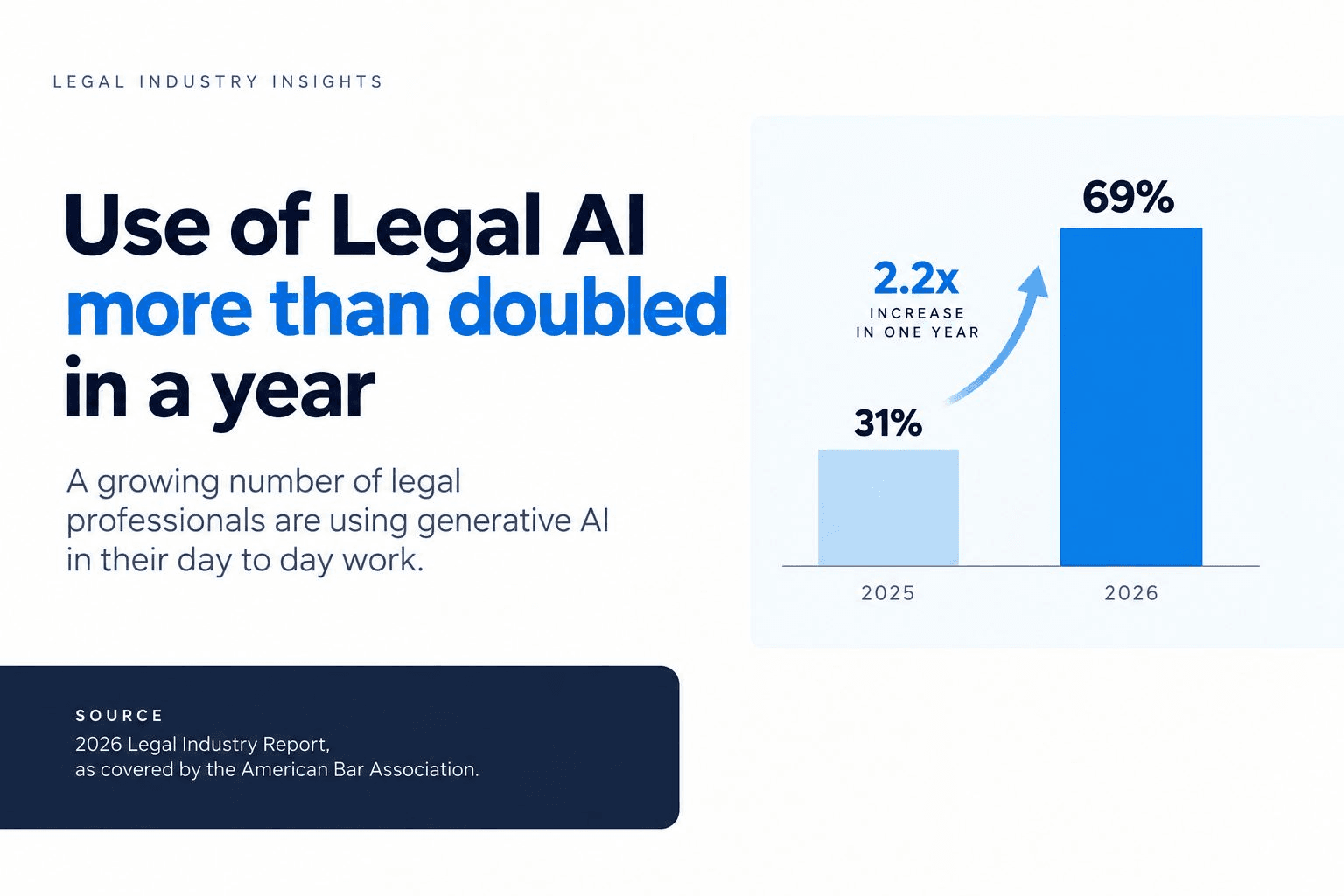
AI is increasingly being used across legal workflows, including research, document drafting and summarization. According to the American Bar Association, legal professionals are incorporating generative AI into several of these day-to-day activities.
As part of their AI governance approach, law firms should consider establishing which tools are approved, what information may be entered, where prompts and files are processed, how data is retained and whether providers use customer data for model training. Firms should also define appropriate processes for reviewing AI-generated outputs and assigning accountability for AI-assisted work.
Permissions also matter when AI tools connect to document repositories or internal knowledge systems. AI applications should be designed to respect the source system's access controls so that users cannot retrieve matter information they are not authorized to access. Human review, logging and audit trails become increasingly important when agent-based systems can retrieve data, update systems or initiate actions.
7. Align Technology with the Legal Workload
A law firm's technology roadmap should be built around the systems attorneys depend on to manage matters, documents, communication and client work. Legal practice management software, legal document management software, eDiscovery tools, Microsoft 365 and secure client access may rely on different combinations of identity, cloud and integration services. Understanding these dependencies can help firms plan upgrades, integrations and technology changes more effectively.
An aging document management system may continue to store files correctly while creating challenges through limited cloud integration, outdated security controls or poor compatibility with newer legal technology. Technology planning should identify systems approaching end of life, applications requiring stronger integration, infrastructure that limits remote access and platforms that may constrain future AI or automation initiatives.
Cloud migrations, application modernization and security upgrades should be sequenced according to legal workflow impact, technical dependencies and business priorities. When additional expertise is needed, IT consulting for law firms can help assess these dependencies and support decisions about which systems to upgrade, integrate, replace or retain.
Conclusion
Law firm IT priorities vary according to firm size, existing systems, client requirements and future technology plans. A practical focus is maintaining secure access to matter information, reliable legal applications and continuity across day-to-day operations.
Technology planning should bring these priorities together by considering how security, infrastructure, applications and emerging technologies support legal workflows. A coordinated roadmap can help firms identify dependencies, address operational risks and plan technology improvements according to business needs.
A practical IT strategy should identify which systems are critical to legal work, where operational or security risks are concentrated and which improvements should be prioritized based on business impact. This may involve strengthening access controls, improving cloud visibility, testing recovery processes, modernizing applications or establishing clearer governance for AI-enabled tools.
12th Wonder supports law firms with the technology expertise and operational capabilities needed across cloud infrastructure, security, applications and managed IT operations. Our approach focuses on building resilient, well-governed IT environments that align technology with legal workflows, business requirements and future priorities.
FAQ
Is Your Law Firm’s IT Ready for What’s Next?
Strengthen security, cloud operations and business continuity with a more resilient IT foundation.